
Design System Vibe Coding: Fix the Context Gap
Why AI coding tools ignore your Figma tokens - and how to fix it with DTCG export, Style Dictionary, AGENTS.md context files for Cursor and Claude Code.
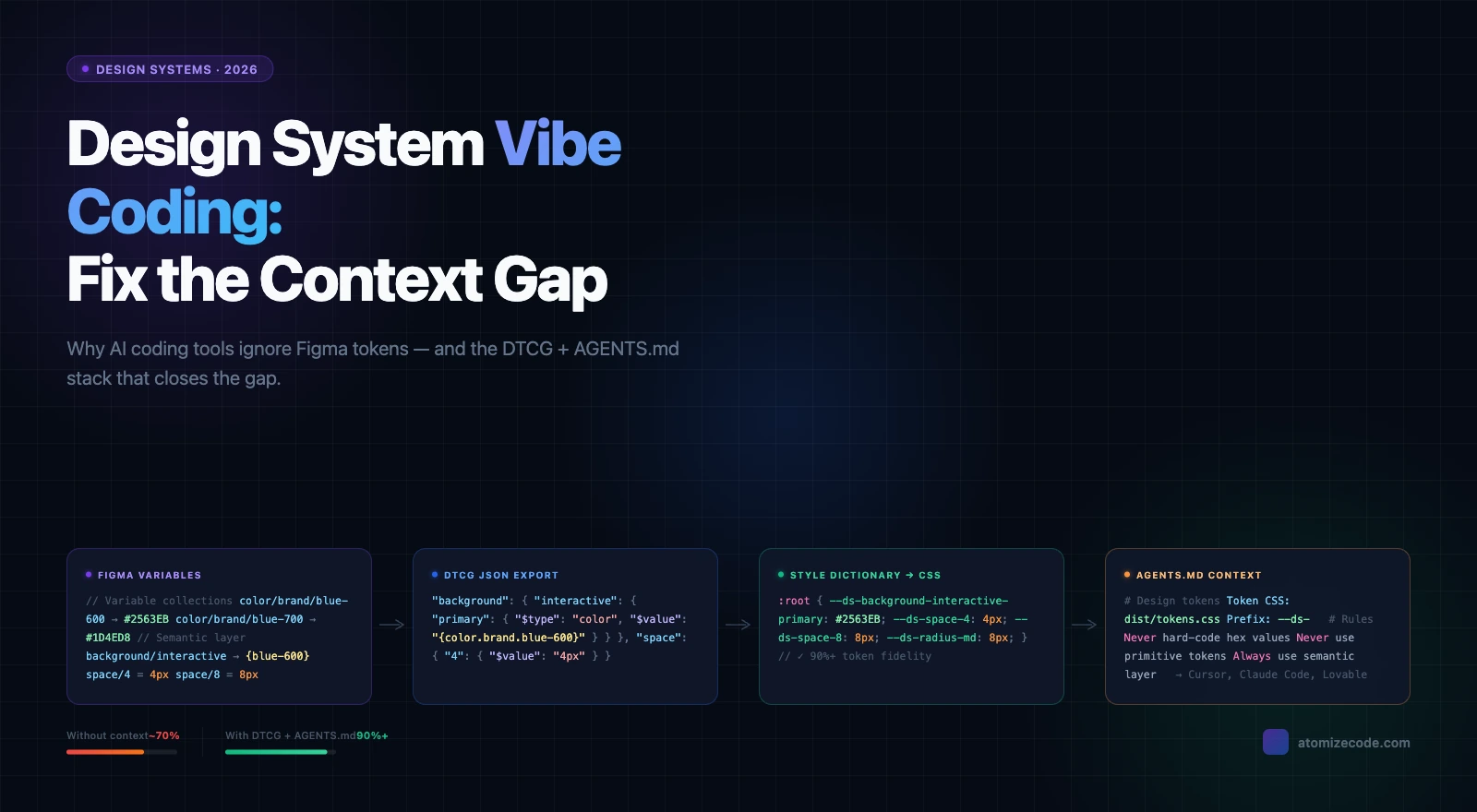
AI coding tools - Cursor, Claude Code, Lovable, and Figma Make - produce inconsistent UI when your design system context is missing. This is the central problem with vibe coding in teams that already run a Figma design system: the AI generates plausible-looking components that ignore your actual design tokens. The fix is exporting your Figma variables as DTCG JSON and providing a concise context file the agent reads before writing a single line of code.
Vibe coding - generating UI through natural language prompts with minimal manual coding - depends entirely on context quality. Without your token structure, naming rules, and component docs, the AI builds from training data: wrong font weights, hardcoded hex values, spacing that matches nothing in your system. Teams that build a proper context stack consistently report token fidelity above 90 percent. Teams that skip it get UI that is close enough to ship but far enough to break consistency.
Why AI tools ignore your design system
AI coding tools have no native awareness of your design system. They pull from training data and your prompt alone unless you explicitly provide your token structure, component usage rules, and spacing logic. The result is UI assembled from the AI's statistical best guess at what spacing, color, and type should look like - not your actual system.
The failure pattern is consistent across tools. Color tokens survive better than spacing tokens because hex values appear in training data more predictably than spacing scales. Semantic token aliases - background/default referencing color/neutral/gray-50 - get bypassed entirely because the AI collapses the alias chain. Responsive tokens built on Figma variable modes rarely survive export at all, because most pipelines flatten modes into a single resolved value.
The 80 percent fidelity ceiling
In practice, teams using AI coding tools without explicit context hit roughly 80 percent token fidelity on clean, well-structured systems - and reaching that requires manual configuration upfront. The remaining 20 percent breaks on nested components, mode-based tokens, and semantic alias chains. This is not an AI limitation. It is a context gap that a well-structured DTCG export and a one-page context file can close.
Token survival rate in AI-generated code without explicit context
| Token type | Typical survival rate | Common failure mode |
|---|---|---|
| Brand colors | 70-85% | AI writes hex literals instead of token references |
| Spacing scale | 40-60% | Hard-coded px values from training data |
| Typography tokens | 50-65% | Font weight and size tokens dropped for nested text |
| Semantic aliases | 20-40% | AI uses primitive tokens directly, bypassing semantic layer |
| Mode / responsive tokens | 10-25% | Multi-mode variables flattened or ignored entirely |
The token format AI coding tools actually read
DTCG JSON is the token format most likely to survive the full pipeline from Figma export to generated code. Defined by the W3C Design Tokens Community Group, it uses $type and $value fields that Style Dictionary and most AI-aware build tools understand natively. A color exported as a bare hex string in flat JSON is useful but ambiguous. The same color in DTCG carries its type, its semantic role, and its alias chain - information that lets AI tools generate semantically correct references instead of hard-coded values.
Two-layer structure: primitives and semantics
Structure your DTCG token file with a primitive layer and a semantic layer. Primitives hold raw values. Semantics hold references to primitives. This separation is what lets AI tools understand the difference between color/brand/blue-600 (a raw value) and background/interactive/primary (a role that references that value). Without the semantic layer, AI-generated code skips the alias chain and writes the hex value directly.
Exporting Figma variables for AI consumption
Figma's native variable export produces a proprietary JSON format, not DTCG. To get DTCG output, use Tokens Studio or a compatible plugin that maps Figma variable collections to $type/$value fields. Export each collection - primitives, semantics, component overrides - as a separate file. This preserves the alias chain AI tools need to resolve references correctly. Flattening everything into a single resolved-value export breaks the two-layer structure and removes the semantic information the AI needs. For the full token export and design system parity story, the key is keeping the layers intact from Figma through to the final CSS output.
From DTCG to CSS: the Style Dictionary step
Style Dictionary transforms DTCG JSON into platform-specific output: CSS custom properties, SCSS maps, TypeScript constants. For AI coding tool consumption, CSS custom properties are the most effective output because every AI tool trained on web code knows how to reference --variable-name syntax. Run Style Dictionary as part of your build step so the CSS output stays in sync with your Figma token source automatically.
Writing context files AI agents actually read
An AGENTS.md file in your repository root is the fastest way to give any AI coding tool the context it needs. Keep it short and scannable - three to five sections covering token location, naming convention, usage rules, and a pointer to component docs. AI agents extract facts, not prose. Dense paragraphs will be skimmed or missed. The goal is a file a non-dev can drop into Cursor or Claude Code and immediately start generating UI that references real tokens.
The setup that works in practice: CSS output file location, DTCG source location, a naming convention table, explicit rules about which token layer to use, and links to component markdown docs. One team in r/DesignSystems described their approach as an AGENTS.md entry point plus a Style Dictionary CSV export for tokens plus individual usage files in /docs/components/. Non-devs opened Cursor, the agent read the file, and token references appeared in generated output from day one - without any extra prompting.
What breaks token fidelity in nested components
Nested components are the most consistent failure point. When an AI generates a Card that contains a Button, it often reconstructs the Button from scratch rather than importing the existing component - and that reconstruction skips the token references established in the original. Two fixes work reliably: provide component-level usage docs that explicitly list the tokens each component depends on, and add a project rule prohibiting reconstruction of components that already exist in the library.
Token fidelity problems, root causes, and fixes
| Problem | Root cause | Fix |
|---|---|---|
| Hard-coded hex values | No color token context provided | Add CSS custom properties to context; add no-hardcode rule to AGENTS.md |
| Arbitrary spacing px | Spacing scale missing from context | Add space token table to AGENTS.md with px equivalents listed |
| Semantic aliases bypassed | AI reads primitive layer directly | Explicitly prohibit primitive token use in AGENTS.md rules |
| Responsive tokens missing | Multi-mode variables not documented | Document each mode name, when it applies, and which tokens change |
| Token names transformed in output | Style Dictionary renames without mapping | Fix transform config; add token-name linting to CI pipeline |
| Nested component drops tokens | AI reconstructs child component from scratch | Add component-level docs listing required tokens per component |
Final verdict - Vibe Coding Tokens
The token fidelity gap in AI-generated UI is a context problem, not an AI problem. Export Figma variables as DTCG JSON, run them through Style Dictionary to produce CSS custom properties, and write an AGENTS.md that names token locations, naming rules, and usage constraints. Add component-level docs for your most-used components. Teams that implement this stack move from 60-80 percent fidelity to 90 percent and above - and non-devs using Cursor or Claude Code start generating UI that matches the design system rather than approximating it.
AI coding tools have no native awareness of your design system. They generate code from training data unless you explicitly provide your token structure as a CSS custom properties file and a context document (AGENTS.md) that tells the agent where your tokens live and how to use them.
DTCG (Design Tokens Community Group) JSON is the most widely supported format for the full pipeline. Export from Figma using Tokens Studio, run through Style Dictionary to generate CSS custom properties, and include the CSS output in your project context. CSS custom properties are what most AI tools reference natively when generating web code.
AGENTS.md is a context file placed in your repository root that AI agents read at the start of a session. It tells the agent where your token files live, explains your token naming convention, and specifies rules - for example, that primitive tokens must never be used directly and hex values must never be hard-coded.
Add your CSS custom properties file to the agent context and explicitly state in AGENTS.md that hex values and pixel sizes are never to be hard-coded. Add a linting rule that flags hard-coded colors and spacing in generated output. Context plus enforcement catches most cases in practice.
Multi-mode Figma variables (light/dark, compact/default) are typically flattened to a single resolved value in standard CSS output. Document each mode explicitly in your context files - its name, when it applies, and which tokens change - so the AI can apply the correct mode rather than hard-coding a single resolved value.
Without context: roughly 70-85% for color tokens, 40-60% for spacing, and under 30% for semantic aliases and responsive tokens. With DTCG export, Style Dictionary CSS output, and AGENTS.md context: 90%+ fidelity on well-structured systems. Nested component fidelity improves further with per-component usage docs.
Figma MCP lets AI tools read your Figma file directly, which improves design accuracy. But MCP alone does not ensure token fidelity in generated code - you still need the DTCG JSON export and AGENTS.md so the agent knows which CSS custom properties to reference when writing code. For more on the Figma MCP setup, see our Figma MCP guide.